
Why move to Next after React?
Many developers who start learning React ask why we need Next.js if we already have React. In this article, we'll gain a clear understanding of:
- Why move to Next.js
- Why the Page Router existed in Next.js
- Why we ditched the Page Router and moved to the App Router
Why move to Nextjs?
In simple react made application when you type the url on the page then it will hit your server and server will give you a response to the browser in the form of JS Bundle.
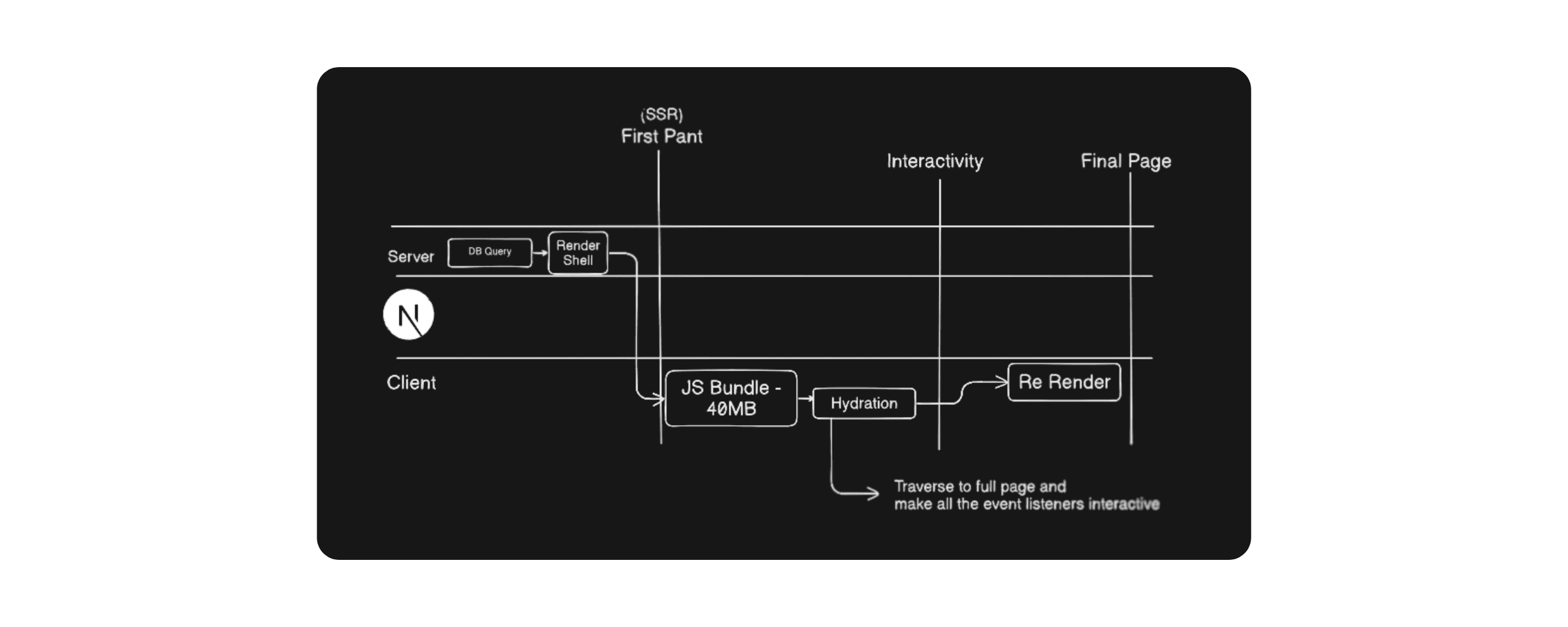
Our browser on the client side will download this JS Bundle and assume this Bundle is of about 40MB so for that user has to wait as long as its machine will download it. But what will happen at the mean time is that you wait. And you will see the blank screen only. So this is the first problem we will encounter.
Render Shell: The initial React code render
Once the JS Bundle downloads, the browser displays a render shell—users see loading indicators, but the data hasn't been fetched yet. But after this there will be call to DB and then it will respond with the data to the frontend.
Problems with simple React?
- Blank Screen: Till JS Bundle download there was a blank screen only to which user is staring to.
- First Paint Delay: First Pant will get render after Render Shell that means user can interact with button as js is downloaded but really dont have the data.
- Delayed Data: After the db query and re render the final page will get rendered now.
- SEO Problem: Plain React is difficult for search engines to crawl effectively.
Moved to Page Router (Nextjs)
The Page Router introduced Server Side Rendering, where the database query and initial React code render on the server. Users see the screen immediately, but it's not interactive yet.
Next, the JS Bundle downloads and hydration occurs, making the page interactive. At this point, the page becomes fully reactive. Finally, the page re-renders with complete interactivity. The fully functional page is now ready for users.
What we solved:
- SEO Problem: Without the blank screen, search engine optimization works properly. The HTML and CSS static files are available after the render shell, which helps with SEO.
- UI/UX Problem: This approach also improves the user experience.
What problems remain?
Suppose we have 200 components on the server. We need to download the JS bundle for each one on the client side (browser). But what if some components don't have any interactivity? Why download their JavaScript? This adds unnecessary download time.
Moved to App Router (Nextjs)
Later, the App Router was introduced. It brought a new concept where we declare which components are client-side and which are server-side directly in the code.
Server components have no interactivity, so there's no need to download them—they don't go to the browser. Only client components are sent, enabling interactivity where needed.
Problems reduced?
Our bundle size is now significantly reduced, which helps the website load much faster.
Summary
By moving from plain React to the Next.js App Router, we solved the three biggest headaches in web development:
- Better SEO: Since the server sends a complete page instead of a blank one, search engines can read your content instantly.
- Instant Visuals (UI/UX): Users see the "First Paint" immediately. They aren't stuck staring at a white screen.
- Faster Data: The database query happens on the server. The data is already there the moment the page shows up.
- Lightweight Loading: By using the App Router, we stopped sending "useless" code to the browser. Everything else stays on the server, making your website incredibly lightweight and snappy.